Hard Drive Data Backup Tool, Data Converter Copier
Hard Drive Tool 2.5 “/3.5” SATA HDD IDE HDD Data can be retrieved with the Hard Drive Data Tool, especially from old hard drives that are now inaccessible due to the lack of IDE and SATA interfaces.

Hard Drive Tool, Data Converter, Copier, Buckup
The Hard Drive Tool is an affordable solution to the problem of bridging the gap between newer and older motherboard interfaces. Just plug and play! No drivers or software needed!
Hard Drive Data Tool adapter, engineered with USB 3.0 interface offers data transfer speeds up to 5Gbps. Backward compatible with USB 2.0. SATA adapter is universally compatible with Windows 10/8.1/8/7/Vista/XP, Mac OS 9/10, Linux, etc.
Plug and Play – Hard Drive Transfer Made Easy – No Drivers Needed
Hard Drive USB Data Tool Product Details
Hard Drive Data Tool USB Adapter Overview
The Hard Drive Data Tool USB Adapter is meticulously designed with a USB 3.0 interface, providing lightning-fast data transfer speeds of up to 5Gbps. This ensures swift and efficient transfer of files and data. Moreover, it is backwards compatible with USB 2.0, ensuring versatility and compatibility with older devices and systems.
Universally compatible, the SATA adapter seamlessly integrates with a wide range of operating systems, including Windows 10/8.1/8/7/Vista/XP, Mac OS 9/10, Linux, and more. This broad compatibility ensures that users can effortlessly utilize the adapter across various platforms without encountering compatibility issues.
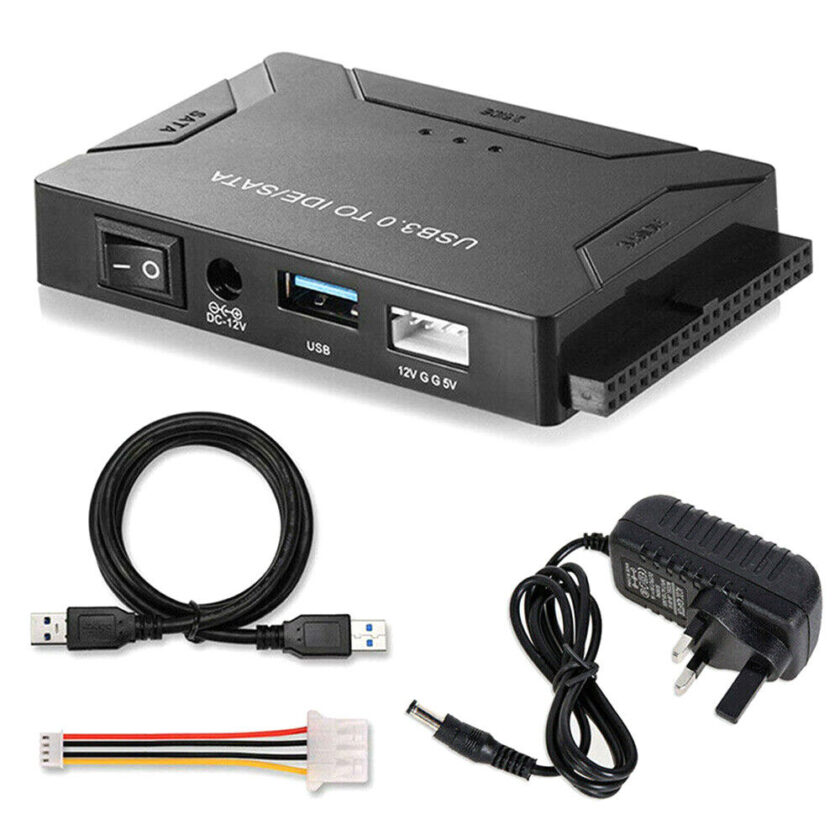
In addition to its exceptional performance, the Hard Drive Data Tool USB Adapter boasts an elegant and slim design. Its compact form factor allows for easy portability and storage. Whether you’re on the go or working remotely, the adapter’s sleek design enables you to conveniently carry it in your laptop’s bag, backpack, or travel case. This ensures that you always have access to the adapter whenever you need it, without adding unnecessary bulk or weight to your belongings.
With the Hard Drive Data Tool USB Adapter, users can enjoy the convenience of seamless data transfer and connectivity, combined with the versatility and portability required for modern computing needs. Whether you’re a professional handling large volumes of data or a casual user looking for a reliable solution to connect and transfer files between devices, this adapter offers the perfect blend of performance, compatibility, and convenience.
Extracting Old Information from Old Hard Drives Using the Hard Drive Tool
Have you ever found yourself with old hard drives containing valuable data, but no way to access them due to compatibility issues with newer systems? The Hard Drive Data Tool provides an affordable solution to this problem, bridging the gap between newer and older motherboard interfaces. Now is the time to retrieve all the files that you may have thought were lost!
Hard Drive Data Tool A Must-Have Tool for Computer Repair Engineers
The Hard Drive Data Tool is the go-to solution for computer repair engineers. It allows for the extraction of data from any old hard drive, including slow hard drives or ones that cannot be read from computers internally. Whether you’re dealing with outdated hardware or encountering compatibility issues, this tool ensures that you can retrieve valuable information with ease.
Hard Drive USB Data Tool Universal Compatibility
One of the key advantages of the Hard Drive Data Tool is its compatibility with any operating system, including Mac, Linux, and Windows. This means that regardless of the system you’re using, you can seamlessly connect and extract data from old hard drives without any hassle. However, it’s important to note that 3.5-inch hard drives will require additional power to function properly, ensuring a smooth and efficient data extraction process.
Versatility and Hard Drive Recovery Tool Options
In most cases, using the Hard Drive Data Tool will solve and recover your data effortlessly. However, for more complex situations or additional recovery options, third-party programs can be used in conjunction with the tool. Popular choices include clone tools like EaseUS Backup Tool, Clonezilla, or Rescuzilla. These programs offer advanced features and functionalities to enhance the data recovery process, providing users with multiple options to suit their specific needs.
Hard Drive Data Tool Has Seamless Integration with Windows 10, Mac, and Linux
The Hard Drive Data Tool is designed for user convenience, allowing for easy integration with various operating systems. Once connected to a computer, whether running Windows 10, Mac, or Linux, the device is automatically detected.
Basic drag-and-drop functionality enables users to perform basic data recovery without the need for any third-party programs. This intuitive approach simplifies the data extraction process, ensuring a smooth and hassle-free experience for users of all levels.
In conclusion, the Hard Drive Data Tool offers a cost-effective and efficient solution for extracting old information from old hard drives. Whether you’re a computer repair engineer or an individual looking to retrieve valuable data, this tool provides the versatility, compatibility, and ease of use needed to tackle any data recovery task with confidence.
Hard Drive Data Backup Tool – Home or Office
The Hard Drive Data Tool is an affordable solution to the problem of bridging the gap between newer and older motherboard interfaces. Now is the time to retrieve all the files that you may have thought were lost!
The tool of computer repair engineers. Extract data from any old hard drive, slow hard drives, or ones that cannot read from computers internally.
Any operating system including Mac, Linux, and Windows can use the Tool. Note that 3.5 hard drives will need additional power to function properly
In most cases, this will solve and recover your data, 3rd party programs are usable with this tool such as clone tools like EaseUS backup tool, Clonezilla, or Rescuzilla Many more 3rd party programs are found using search engines.
Windows 10 & Mac or Linux will automatically find the device, Once Connected to a computer Basic drag and drop for basic data recovery is easily done without any use of 3rd party programs.
All cables provided include Power cable, data cables Hard Drive Data Tool
Computer Repair – Apple Repair – iMac Repair – Macbook Repair – Custom Built Desktops – Laptop Repair – Motherboard Repair – Desktop Repair
Contact Us – Find Us On Facebook